

What is an accessibility overlay?
A website accessibility overlay (also called an accessibility widget or an accessibility plugin) floats on top of a website to provide users with various customization options for accessibility. They modify certain accessibility issues without requiring direct changes to the website’s source code.
Why did we conduct this study?
As a web design and development agency, a popular request from our clients is to add an accessibility overlay. This is a particularly common request from our healthcare web design and nonprofit web design clients.
Many people see accessibility overlays as a surefire way to make a website accessible, without realizing that they do more harm than good. Our goal with this research study was to survey people with visual impairments about their perspective on accessibility overlays and share our findings with the web development community.
What was the process?
We worked with the American Council of the Blind and created a survey asking internet users with visual impairments about their perspective on the effectiveness of accessibility overlays. We also asked respondents what makes a website more accessible to them. The survey was distributed through the American Council of the Blind newsletter.
What were the results?
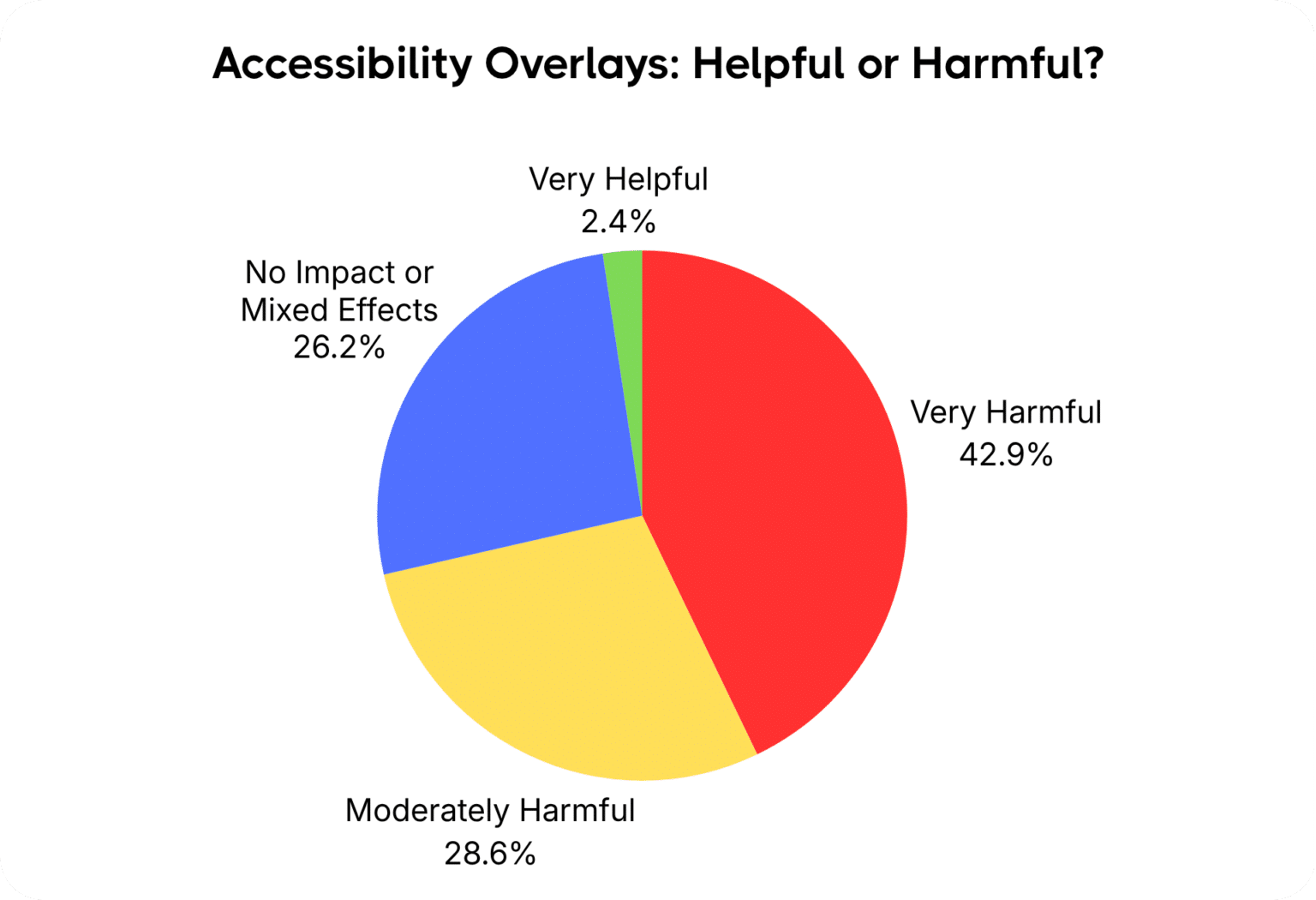
Respondents overwhelmingly indicated that accessibility overlays are harmful. We received 42 responses total, including 30 respondents who are fully blind and 12 who are partially blind. 42.9% (18 respondents) indicated that accessibility overlays are “Very Harmful”, 28.6% (12 respondents) indicated that they are “Moderately Harmful”, 26.2% (11 respondents) indicated that they have “No Impact or Mixed Effects”, 0 respondents indicated that they are “Moderately Helpful”, and 2.4% (1 respondent) indicated that they are “Very Helpful”.
Insights from survey respondents
Survey respondents provided important insights and actionable strategies to improve website accessibility for users with visual impairments. Here are the highlights:
“Seek input and testing from native assistive technology users”
Running your website through an accessibility testing tool like WAVE is a good first step to catch some key accessibility issues quickly, but automated testing tools only catch a fraction of accessibility issues. It’s best to have real people with visual impairments test your website to catch problems and provide feedback.
“Put in actual effort to human code the site to WCAG standards”
Instead of using an overlay, manually optimize the actual source code following the Web Content Accessibility Guidelines (WCAG) Version 2.2 and meet the “AA” standard to be compliant with accessibility laws like the Americans with Disabilities Act (ADA) and the Accessibility for Ontarians with Disabilities Act (AODA).
“Use alt text to describe images”
Alt text is the description of an image in the website code for screen readers to explain the image to people with visual impairments. It’s important for the alt text to provide as much detail as necessary to communicate the entire context and meaning of the image. There are many plugins that generate alt text automatically, but they’re usually not good enough and it’s better to write alt text manually or at least review and edit the automatically generated alt text.
“Overlays are performative and usually cause many problems with screen readers”
Accessibility overlays look like a good thing to use at first glance, but they cause technical issues for screen readers, which is what actually matters to people with visual impairments. Another respondent said “develop websites with the screen reader installed on my device in mind vs. assuming I want to engage with an overlay”.
“Use high contrast colors”
For people with partial blindness / low vision, it’s important for there to be sufficient contrast between your foreground and background colors for text readability, as well as a sufficient font size. Accessibility overlays provide users with the ability to adjust color contrast levels and font sizes, but your color contrast and font sizes should already be at a compliant level by default. Beyond that, people with low vision may already have their own assistive technology to adjust the display of the site (colors, fonts, etc), and the overlay simply causes technical conflicts with the user’s assistive technology.
Use our Color Contrast Checker to see whether your color contrast levels are compliant with WCAG 2.2 AA.
“I want to be able to navigate non-visually using keyboard commands”
Along with screen readers, keyboard navigation is one of the most essential factors for website accessibility. People with visual impairments are typically using their keyboard to navigate your site – not their mouse. Make sure that all elements on your site are accessible using keyboard navigation and that no “keyboard traps” occur.
“Use links with text tags”
Also known as anchor text, this is the text associated with a hyperlink. Descriptive anchor text helps all users know where a link will send them, but it’s especially important for people with visual impairments. Make it as descriptive and clear as possible.
“Make fillable form fields labeled correctly”
Some forms don’t have proper <label> tags, meaning users who are blind cannot hear what information is requested in a field. Some forms also don’t work via keyboard navigation. These are essential fixes.
“Use correct coding semantics and appropriate content structure and hierarchy”
Use descriptive/semantic HTML5 elements (ie. <article>, <nav>, <main>, <button>, etc) to define content meaning instead of using generic <div> tags. Use ARIA attributes to tag various elements for assistive technology, such as dropdown menus and external links. And use proper hierarchy (ie. <h1> through <h6>) to have a logical, nested structure.
Other studies confirm our findings
It’s not just us – there are other studies that have found similar results, such as The Promise and Pitfalls of Web Accessibility Overlays for Blind and Low Vision Users, a study published in the ACM Digital Library.
Accessibility overlay companies get sued regularly for false claims and should not be perceived as a way to make your website accessible. Check out this lawsuit where the FTC ordered accessiBe (an overlay company) to pay a million dollar fine for making false claims.
Start taking action…
Step 1: Remove your website accessibility overlay.
Step 2: Manually optimize your website for accessibility. If you’re using WordPress, check out our WordPress Accessibility Guide.
Step 3: Create an accessibility statement with the help of our Accessibility Statement Generator. Even if your website isn’t fully compliant, it’s important to have an accessibility statement.
Step 4: If you need help making your website more accessible, check out our Accessible Web Design Services.
